
Infinite scroll is a feature that’s gained popularity in recent years because of the slick, modern user experience it can provide. Implementing infinite scrolling does come with a number of challenges, and keeping it SEO-friendly is among the biggest.
This is a fairly technical post, so for the non-technical marketers who follow along, this is a great page to bookmark and share with your developers to get confirmation that your infinite scroll implementation is adhering to best practices for SEO.
What Exactly is Infinite Scroll?
Infinite scroll, as the name implies, allows a reader to scroll down a web page and continually view new content without ever reaching the end. It’s also sometimes referred to as “endless scrolling,” “continuous scrolling,” “lazy loading,” “autopager,” or “unpagination.” Well-executed, it’s an engaging web browsing experience because you never have to click on a link and wait for a new page to load to see the next set of headlines, images, or other content.
The challenge for web developers implementing infinite scroll is that you can’t deliver an endlessly long page of content and still maintain reasonable page load speed. To keep page loads snappy, you’ve got to serve it up in bite-sized pieces.
A typical infinite scroll implementation will render a specific number of items (usually headlines in my world) for the initial page load, but then use JavaScript to asynchronously load in new content once you scroll past a certain point in the page. Ideally the new content will begin loading in the background as you scroll before the asynchronous JavaScript calls are even noticed.
For an example of infinite scroll, check out Mashable.
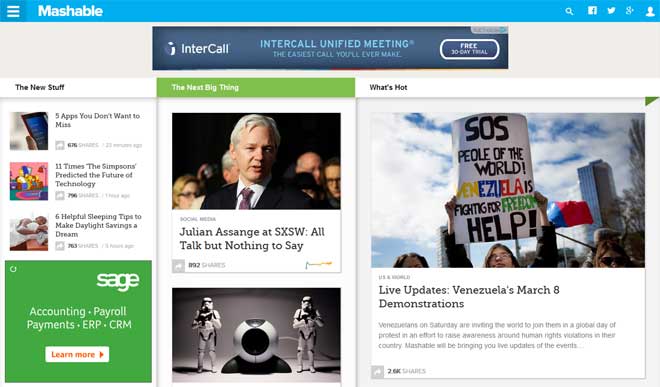
Infinite scroll implementation on Mashable, which uses a noscript tag
Chances are you’ve been on Facebook, so you’re probably familiar with infinite scroll from a user experience standpoint, even if you didn’t know what it was called. Most social networking sites use infinite scroll these days, along with Google Images, Mashable, and a variety of popular blogs and news sites. Anil Dash even suggested a couple years ago that it’s time for the Internet to stop publishing webpages and start publishing streams. Infinite scroll is a perfect solution for stream experiences.
Why Infinite Scroll is Bad for SEO
Simply put: Google doesn’t crawl JavaScript. Actually we know that Google has increasingly begun to execute JavaScript as they seek to scrape publisher’s valuable content organize the world’s information and make it accessible. For the purposes of this discussion (and your optimized website), we’ll assume that Google and other search engine crawlers don’t crawl JavaScript.
What this means is that the content delivered in the initial page load (and rendered in the HTML source code of your web page) is the only content visible to search engines. The second and subsequent page loads that appear as an endless stream are pulled in with asynchronous JavaScript calls, which means search engines won’t see any of it.
How to Have Your Cake and Eat It Too
Google’s recent guidance on infinite scroll tells us to ensure our content management systems produce a paginated series of pages (component pages) to be presented in tandem with the infinite scroll experience. The image below from Google shows how this looks, with the infinite scroll experience on the left, and the corresponding paginated series of component pages on the right.
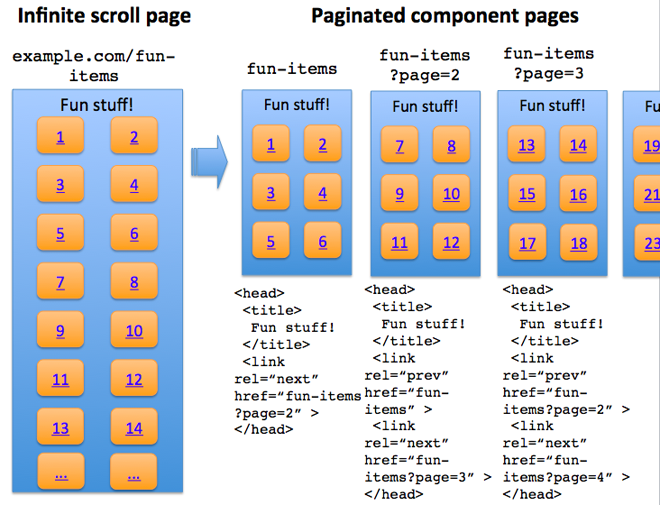
Google’s infinite scroll guidance indicates the use of classic pagination in tandem with the infinite scroll experience.
This is exactly what I’ve been advising my clients to do for a while now. You can read the full post on the Official Google Webmaster Central Blog to get detailed guidance, but here’s a quick recap:
SEO-Friendly Recommendations for Infinite Scroll
- Create a series of pages that will serve as the component pages that get fed into the infinite scroll experience. Make sure each page is individually accessible and visible with JavaScript disabled. Include a reasonable number of items on each page so that they load quickly, and ensure there’s no overlap of items as you navigate from one page to the next.
- Follow best practices for SEO-friendly URLs and make sure each component page in the series can be accessed individually in a browser.
- Set up classic pagination that allows users and search engine crawlers to navigate directly to each component page in the series. Be sure to follow best practices for pagination using rel=next and rel=prev.

An example of classic pagination
- Use the HTML5 History API to implement replaceState/pushState on the infinite scroll page. This will allow you to update the URL in the address bar automatically as the user scrolls down the page. This mimics the URL change that that would occur if the user actually clicked on pagination links. If the user copies the URL out of the address bar after scrolling way down a page, the directly accessed link will go straight to the desired point in the series. It also allows the user to serially back up since your JavaScript code can store pages in the browsing history.
There are a number of resources out there for learning how to implement infinite scroll and leverage the HTML5 History API. This article, Manipulating History for Fun and Proft, is a great starting point. The Twitter Engineering Blog also published an insightful article on how they approach this technique, which they describe as “Hijax + server side rendering.” The idea is that they use AJAX to “hijack” the URL target from an onClick event and, instead of allowing the click to generate a call back to the server, they use it for the AJAX call. The end result just looks like a fast page load to the user.
What’s Missing from Google’s Infinite Scroll Guidance
If you decide to implement infinite scroll following Google’s guidance, you might wonder how, exactly, to provide the infinite scroll experience for users with modern browsers in tandem with classic pagination for users who don’t. As is often the case, there’s more than one way to skin a cat.
What this boils down to are the concepts of “progressive enhancement” or “graceful degradation.” Progressive enhancement basically means you start with an experience that’s accessible to all browsers, and then progressively enhance that basic experience by adding new layers of functionality for modern browsers. Graceful degradation is very similar, but the nuanced difference is that you start with a full-featured experience, and then make sure stuff either doesn’t break or breaks gracefully in older browsers.
SEO-Friendly Infinite Scroll with Graceful Degradation
Mashable is one of the best known examples of a major publisher who has implemented infinite scroll using the principle of graceful degradation. If you have javascript enabled, you get the infinite scroll experience; if not, you’ll see the contents of a
A large number of links appears at the bottom of Mashable’s homepage in a noscript tag.
Although this is an example from a major tech-savvy publisher, it’s not the implementation I would recommend for my SEO clients. In Adam Sherk’s post, “SEO Tips for Infinite Scrolling,” he and I discuss in the comments area that a noscript tag would not be the most desirable method for exposing pagination links to non-JavaScript browsers. I’m not sure about Adam’s reasoning for that (maybe he’ll clarify in the comments here), but for me it’s because of the history of abuse by SEO spammers associated with this tag.
SEO-Friendly Infinite Scroll with Progressive Enhancement
My preferred method for implementing search-friendly infinite scroll is based on the progressive enhancement approach. Start with an experience that works without JavaScript enabled and progressively enhance that experience with infinite scroll. To accomplish that, it might be helpful to use a feature detection library, like Modernizr.
One of the most helpful and cleanly-coded examples I found for this approach is the “Infinite AJAX Scroll” jQuery plugin page. If you look at their example here, you’ll see classic pagination when you have JavaScript disabled, and infinite scroll with the URL in the address bar updating as you scroll down when you have JavaScript enabled.
I would love to wrap this up with a great SEO-friendly infinite scroll example from a major publisher, but I honestly couldn’t find one that really nails it. There’s Google Images, of course, but that’s a somewhat different use case. If you have a good example of SEO-friendly infinite scroll on a major news/media publisher site, by all means share it in the comments below. I’m going to have a great one to share in a couple months, so stay tuned.