
The “Top Stories” news box in Google is a critically important search feature for news publishers. At a time when AI overviews are syphoning off large amounts of traffic that would otherwise go to publisher sites, Top Stories remains a popular search feature that appears without a competing AI overview in the search engine results pages 96% of the time.
In my opinion, one of the best ways to increase your chances of appearing (and staying) in Top Stories is to get a “Live” badge. In fact, for the biggest national news stories that develop in real time, minute-by-minute, using a Live Blog format has become table stakes for maintaining visibility in Top Stories.
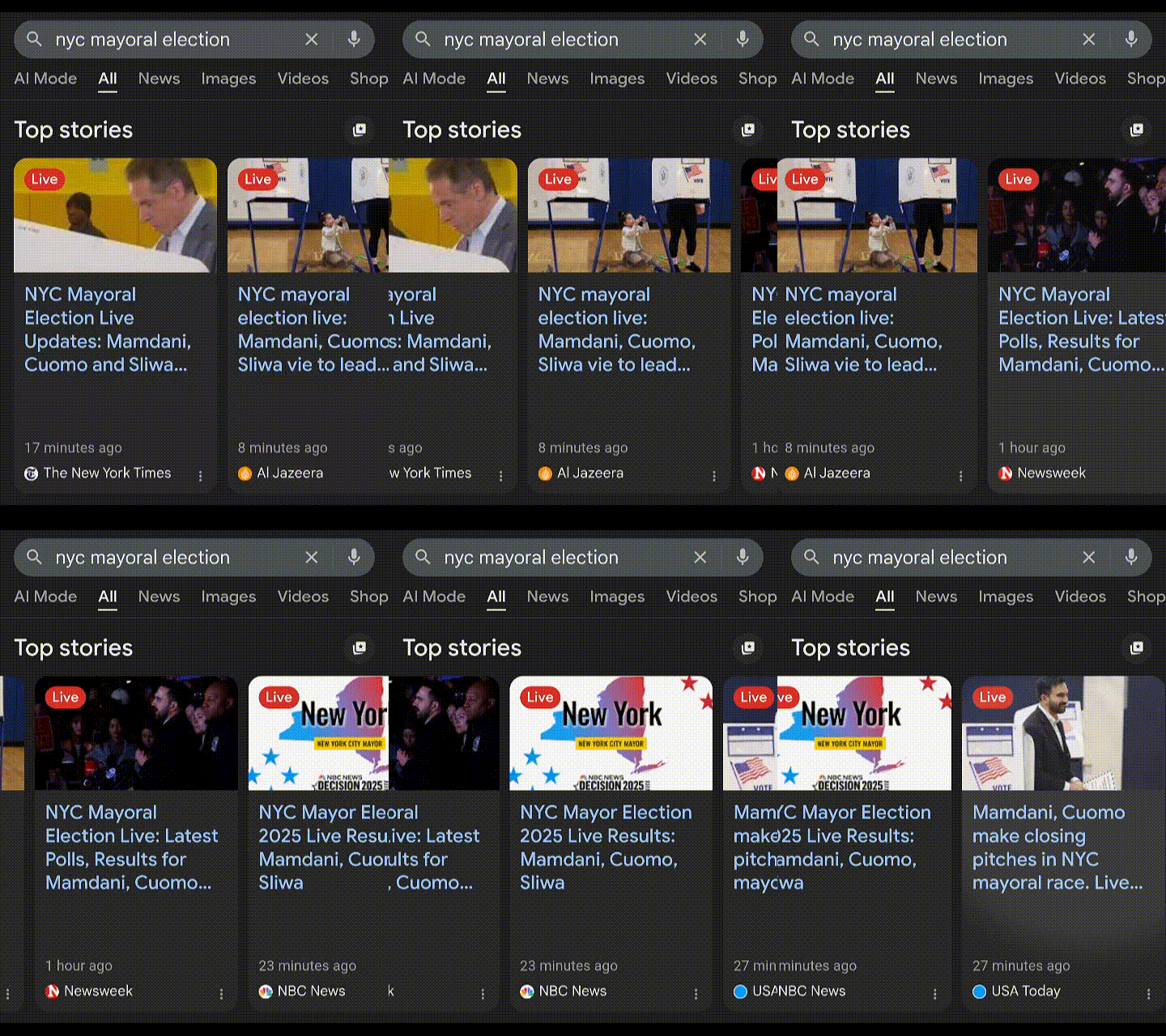
If you’ve been wondering how to get one of those red “Live” labels (or “pills”), you’ve come to the right place. Below, I’ll provide some of the technical details to get it implemented, as well as review some of the strategies top publishers are using to leverage this tool most effectively.
[ez-toc]
What is a Live Blog?
Live blogs are web pages that are updated frequently to provide rolling coverage of an event in real time. A given live blog consists of a series of in-page updates (blog postings) that appear on a page in reverse chronological order (newest on top), each with a unique timestamp and headline.
Live blogging isn’t new. Back in the day, bloggers would live blog industry events, for example, to update their readers in near real-time on the latest happenings and announcements from the event.
In November 2015, Google officially announced (on Google Plus—you’ll have to take my word for it) that they were making the markup that powers live blog carousels publicly available (along with the “Live” badge). That’s when live blogs became much more interesting to news publishers.
Where do Live Blogs Appear in Google?
To find a live blog, look in the Top Stories box in Google when a significant news story is trending. You’ll see a red label that says “Live” in the upper-left corner.
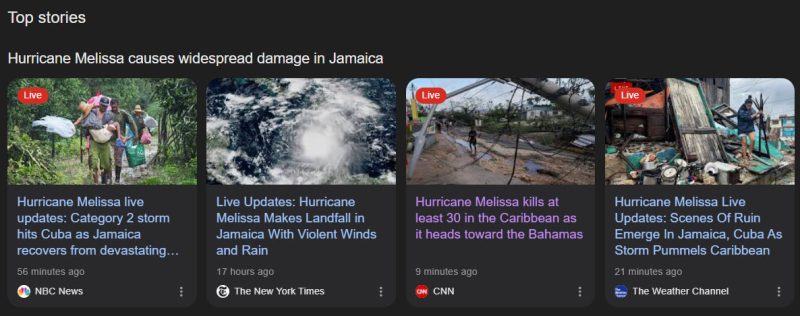
Live Blog Leaders Among U.S. News Publishers
The chart below was provided courtesy of John Shehata, Founder of Newzdash and former Global VP of Audience Strategy at Conde Nast. It shows the top-performing domains that secured “Live pill visibility” across all major news sections (major trending/breaking news, national, world, business, tech, entertainment, sports, science, and health) in U.S. Google Search Mobile from December 2024 through October 2025.
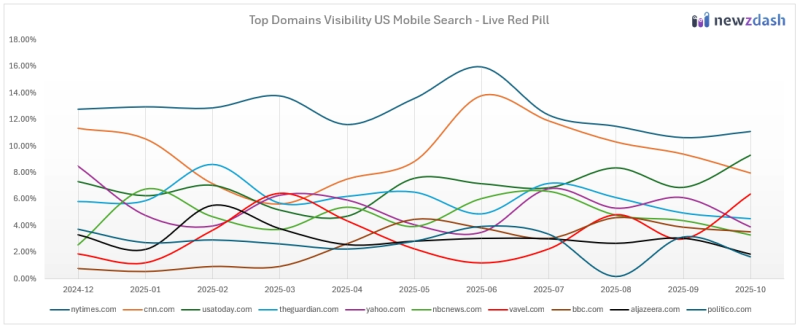
Data Source: NewzDash Real-Time Google Discover Tracker
NYTimes.com remains consistently at the top of the list, which isn’t surprising when you look at the time and attention they’ve given to their Live Blog experience. Below is a further breakdown for September through October 2025. Again, this is U.S.-based and includes all major news sections (learn more about Newzdash’s visibility calculations).
| Rank | Domain | Red Live Visibility |
|---|---|---|
| 1 | nytimes.com | 12.35% |
| 2 | cnn.com | 9.88% |
| 3 | usatoday.com | 7.06% |
| 4 | theguardian.com | 5.95% |
| 5 | nbcnews.com | 5.46% |
| 6 | yahoo.com | 5.22% |
| 7 | vavel.com | 3.28% |
| 8 | aljazeera.com | 3.06% |
| 9 | washingtonpost.com | 2.92% |
| 10 | bbc.com | 2.63% |
| 11 | independent.co.uk | 2.37% |
| 12 | politico.com | 2.31% |
| 13 | cbssports.com | 2.12% |
| 14 | cnbc.com | 1.85% |
| 15 | wsj.com | 1.62% |
| 16 | apnews.com | 1.22% |
| 17 | as.com | 1.13% |
| 18 | go.com | 0.96% |
| 19 | foxnews.com | 0.88% |
| 20 | marca.com | 0.79% |
If you spend much time monitoring Top Stories, much of this list is intuitive. NYTimes.com, CNN.com, USAToday.com, etc. have made significant investments in their Live Blog experience, and it shows, both anecdotally and in the Newzdash data.
One surprise on this list was Vavel.com. I didn’t expect to see them above washingtonpost.com, for example. But when you look at their homepage, you see “Live” all over it. It looks like they’ve made Live Blogs a core part of their strategy, and they use it almost exclusively to cover live sporting events. So that’s a big reason for their success.
But I also have to point out that Vavel’s LiveBlogPosting schema is really well executed. If you want to see a great live example, you really don’t need to look any further than vavel.com. I especially like how they’re using the “about” property with type set to “Event” and all the subproperties that go along with it. Nice job, Vavel!
Can Any Publisher Get the “Live” Badge?
To get the “Live” badge in Top Stories, you need to implement LiveBlogPosting markup. There’s no additional approval or whitelisting required. Any publisher will be automatically considered for “Live” badge visibility in Top Stories if the markup is properly implemented and they’re in compliance with Google News content policies.
But before you roll up your sleeves and jump into the technical details, you should confirm you’re already appearing in Top Stories with at least some regularity. Adding LiveBlogPosting schema won’t open some magical back door that enables you to start appearing in Top Stories if you haven’t been up to this point.
How To Implement LiveBlogPosting Schema
LiveBlogPosting is a Schema type that’s usually implemented via JSON-LD and lives entirely in the of your web page. You’ll need to have the in-page content that corresponds to the entries in your JSON-LD, but that’s for the reader, and it doesn’t impact how your site appears in Top Stories with the “Live” badge.
You can find official documentation via the entry on Schema.org, and it’s also helpful to validate your schema before going live.
A couple of notes before we jump in:
-
I’m completely disregarding AMP in the details that follow because I feel like AMP is on the way out. I’d avoid doing the AMP components unless you have no choice. In that case, you can refer to this AMP-specific documentation. Good luck with that.
-
While it’s technically possible to implement LiveBlogPosting schema in microdata format, why would you do that? Sounds like a major headache to me, so this guide will focus exclusively on the JSON-LD implementation. That’s what I recommend for ease of implementation and debugging, and it’s the method most publishers use.
LiveBlogPosting
LiveBlogPosting is the primary schema markup that provides Google with the essential details about the live blog as a whole. Below are the fields I believe constitute a minimum viable LiveBlogPosting implementation.
Disclaimer: I’ve seen publishers get the “Live” label when not all of these properties are included. These are the properties that, in my opinion, are the most important for not only getting the “Live” label, but ranking competitively in Top Stories with a Live Blog.
Important Schema Properties for LiveBlogPosting
| Property | Description |
|---|---|
@type | Defines the schema type, which must be set to “LiveBlogPosting.” |
headline | The title of the live blog (e.g., the main headline of the overall story). |
description | A summary or abstract of the overall live blog’s content. |
image | An ImageObject associated with the overall live blog post. Keep in mind you can include multiple images and aspect ratios (not a bad idea), along with the ImageObject sub-properties available. You can also include a VideoObject. |
datePublished | The initial publication date and time of the overall live blog post, using the ISO 8601 format. |
dateModified | The date and time the live blog was last updated, reflecting the most recent change, using the ISO 8601 format. This is vital for showing the “Live” status and update frequency. |
coverageStartTime | The date and time the live coverage officially began. |
coverageEndTime | The date and time the live coverage officially ends. You can set this to a time in the future, and it can be updated later to extend it, if needed. |
mainEntityOfPage | The URL of the overall live blog story. It should match the canonical of the parent page. |
author | The creator(s) of the live blog content. This should be a Person or Organization type. Include all contributors here. |
publisher | The organization or person publishing the content. You should use Organization schema with the site’s logo. |
liveBlogUpdate | The container that holds the individual, chronological updates for the live blog that follows. This is the last property before you begin listing your nested individual BlogPosting entries. |
With those opening properties in place, you can begin to output your individual BlogPosting entries. For each new entry, you’ll create a BlogPosting property that contains the following properties nested under the liveBlogUpdate property.
| Property | Description |
|---|---|
@type | Defines the schema type for the individual update, which must be set to “BlogPosting”. |
headline | A title or short summary for this post. |
articleBody | The full text content for this post. |
image | An ImageObject associated with the specific update. This adds visual context to the individual post, and it’s possible for this image to appear in Top Stories. |
datePublished | The creation date and time of this post, using the ISO 8601 format. |
dateModified | The last modification date and time of this post, using the ISO 8601 format. |
url | The direct URL that’s unique to this post. It should have a unique ID appended to identify this post using either a hash (#) or alpha-numeric string appended to the end of the URL. |
| mainEntityOfPage | This is the URL of the overall live blog story. It should match the mainEntityOfPage property from the section above. |
author | The creator(s) of this post. This should be a Person or Organization type. |
publisher | The organization or person publishing the content. (Often referenced from the parent LiveBlogPosting). |
Finally, here’s a fictitious example of what that should look like, pieced together in the of your HTML output. This example has two blog entries, but yours will probably have a lot more:
<script type="application/ld+json">
{
  "@context": "https://schema.org",
  "@type": "LiveBlogPosting",
  "headline": "Headline for My Live Blog Post: Live Updates",
  "description": "Follow live updates as Jim Robinson shows you how to implement Live Blogs flawlessly.",
 "image": {
    "@type": "ImageObject",
    "url": "https://assets.examplepublisher.com/img/main-featured-image.jpg",
    "width": 1200,
    "height": 675
  },
  "datePublished": "2025-11-03T14:00:00Z",
  "dateModified": "2025-11-03T15:25:00Z",
  "coverageStartTime": "2025-11-03T14:00:00Z",
  "coverageEndTime": "2025-11-03T18:30:00Z",
  "mainEntityOfPage": {
    "@type": "Webpage",
    "@id": "https://examplepublisher.com/live/main-live-blog-url",
    "name": "Headline for My Live Blog Post: Live Updates"
  },
  "author": {
    "@type": "Person",
    "name": "Jim Robinson",
    "url": "https://examplepublisher.com/authors/jim-robinson"
  },
  "publisher": {
    "@type": "Organization",
    "name": "Example Publisher",
    "url": "https://examplepublisher.com",
    "logo": {
        "@type": "ImageObject",
        "url": "https://assets.examplepublisher.com/img/logo.png"
        }
  },

  "liveBlogUpdate": [

    { "@type": "BlogPosting",
      "headline": "My Entry-Specific Headline for Update #2",
      "articleBody": "With those opening properties in place, you can begin to output your individual BlogPosting entries. For each new entry, you'll create a BlogPosting property that contains the following properties nested under the liveBlogUpdate property.",
      "image": {
        "@type": "ImageObject",
        "url": "https://assets.examplepublisher.com/img/update-2-image.jpg",
        "height": 800,
        "width": 1200
      },
      "datePublished": "2025-11-03T14:45:00Z",
      "dateModified": "2025-11-03T15:25:00Z",
      "url": "https://examplepublisher.com/live/main-live-blog-url#update2",
      "mainEntityOfPage": "https://examplepublisher.com/live/main-live-blog-url",
      "author": {
        "@type": "Person",
        "name": "Jim Robinson",
        "url": "https://examplepublisher.com/authors/jim-robinson"
      },
      "publisher": {
        "@type": "Organization",
        "name": "Example Publisher",
        "url": "https://examplepublisher.com/",
        "logo": {
          "@type": "ImageObject",
          "url": "https://assets.examplepublisher.com/img/logo.png"
        }
      },
    },

    { "@type": "BlogPosting",
      "headline": "My Entry-Specific Headline for Update #1",
      "articleBody": "LiveBlogPosting is the primary schema markup that provides Google with the essential details about the live blog as a whole. Below are the fields I believe constitute a minimum viable LiveBlogPosting implementation.",
      "image": {
        "@type": "ImageObject",
        "url": "https://assets.examplepublisher.com/img/update-1-image.jpg",
        "height": 800,
        "width": 1200
      },
      "datePublished": "2025-11-03T14:00:00Z",
      "dateModified": "2025-11-03T14:00:00Z",
      "url": "https://examplepublisher.com/live/main-live-blog-url#update-1",
      "mainEntityOfPage": "https://examplepublisher.com/live/main-live-blog-url",
      "author": {
        "@type": "Person",
        "name": "Jim Robinson",
        "url": "https://examplepublisher.com/authors/jim-robinson"
      },
      "publisher": {
        "@type": "Organization",
        "name": "Example Publisher",
        "url": "https://examplepublisher.com",
        "logo": {
          "@type": "ImageObject",
          "url": "https://assets.examplepublisher.com/img/logo.png"
        }
      },
    }
  ]
}
</script>
How to Live Blog: Appearance & Editorial Tips
In terms of what the reader sees on the page, the typical Live Blog builds off of a standard article template. Here are a few formatting recommendations and tips for updating your Live Blog.
Headline
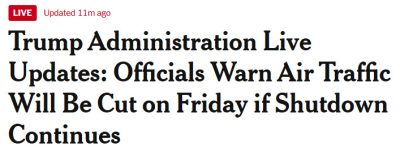
In the main headline of the overall Live Blog, I recommend using “Live” or “Live Updates” in the headline for two reasons: 1) to make it clear it’s a Live Blog, and 2) because “live” is an important keyword to include in your headline for ranking purposes. NYT does this perfectly:
And, of course, in close proximity to the headline, you’ll want to include your overall featured image or video, just like in a regular story.
Quick Summary
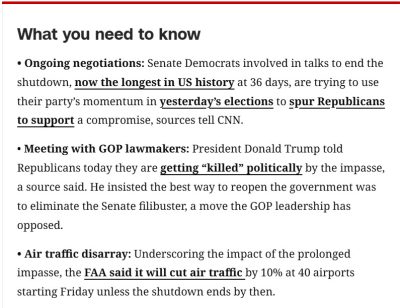
Immediately after the headline and featured image, it’s a good practice to open with a bulleted list of facts about the current situation to get readers up to speed quickly. CNN does a nice job of this with their “What you need to know” section, which immediately follows the main headline.
Individual Entries
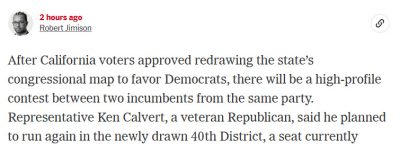
The individual entries (corresponding to the BlogPosting entries in your schema) typically appear in reverse-chronological order, with the most recent update at the top. Each entry has its own headline and timestamp, and you can embed images and videos in them. Again, I like how the NY Times does this. They include a byline and author photo, which highlights the fact that most of their Live Blogs have multiple contributors.
How Often to Update
You need to have a pretty fast cadence of updates to maintain visibility in Top Stories. If the last update looks stale, that’s not a very attractive live result, and it’s going to negatively impact CTR and visibility.
There’s no rule here, and I don’t want to put out a specific number of minutes because it really depends on the event. If you’re providing daily coverage of the Trump Administration, for example, posting an update every couple of hours is probably a good target. If you’re providing live coverage of the Oscars while the Oscars is airing live, then anything beyond 10-15 minutes is going to look stale. Whatever the event, frequently refreshing the content with new, impactful information is going to produce better results.
Timestamps
It’s crucially important to ensure Google can read your timestamps. This is one of the main culprits in problems with the “stickiness” of the “Live” label in Top Stories. Ensure you have alignment between dateModified in the overall LiveBlogPosting schema, dateModified on the latest individual BlogPosting entry schema, and the on-page timestamp that corresponds to the latest individual entry.
Note: If you use relative timestamps on the page, such as “3 hours ago,” I highly recommend using
<time dateTime="2025-11-05T22:47:04.000Z">3 hours ago</time>NewsArticle Markup Isn’t Needed
A common question I get is whether NewsArticle markup should be included in the schema, either as an addition to or nested within the LiveBlogPosting schema. It’s not necessary. The LiveBlogPosting schema alone is sufficient, although it’s not a bad idea to additionally include WebPage schema to access some additional properties for a fuller description of the content. Not required, though.
URLs for Multi-Day Events
I previously recommended that publishers generate a new URL for each day of a multi-day event. That may still be a good idea, depending on your situation, but it is possible to cover multi-day events (over long/indefinite periods) using a permanent Live Blog URL.
Let’s look at both scenarios…
A New URL Each Day
When I originally wrote this post, we were a year into COVID, and it was dominating the news daily.
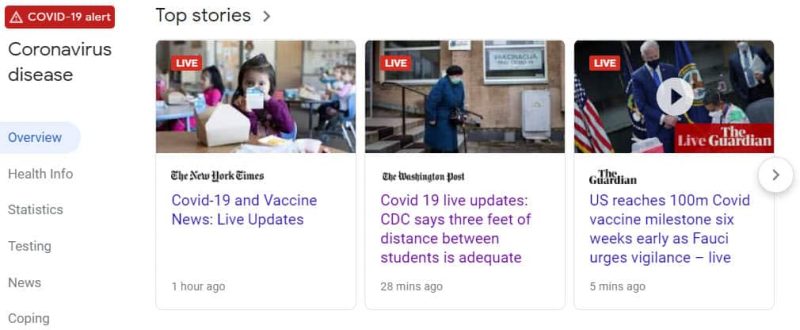
Top publishers effectively leveraged their live templates by creating a new URL every day and parking themselves in the Top Stories box. All day. Every day.
A great example was from The Washington Post’s live COVID coverage, so I’m leaving this here from my original post. Every weekday during COVID, shortly after midnight, they put up a new live blog on a new URL:
https://www.washingtonpost.com/nation/2021/03/19/coronavirus-covid-live-updates-us/ https://www.washingtonpost.com/nation/2021/03/18/coronavirus-covid-live-updates-us/ https://www.washingtonpost.com/nation/2021/03/17/coronavirus-covid-live-updates-us/ https://www.washingtonpost.com/nation/2021/03/16/coronavirus-covid-live-updates-us/ https://www.washingtonpost.com/nation/2021/03/15/coronavirus-covid-live-updates-us/
And they didn’t just use their live blog to publish rolling textual updates. They also used it to spin off lots of additional COVID-related stories throughout the day. I think it’s an excellent approach that takes the live blog concept to the next level by serving as the central hub for a developing story. In fact, this has become sort of a standard approach as most major publishers have caught on to how well it works.
More recently, you’ll see publishers like NY Times publishing daily URLs for their coverage of the Trump Administration, for example:
https://www.nytimes.com/live/2025/11/02/us/trump-news https://www.nytimes.com/live/2025/11/03/us/trump-news https://www.nytimes.com/live/2025/11/04/us/trump-shutdown-news https://www.nytimes.com/live/2025/11/05/us/trump-shutdown-news https://www.nytimes.com/live/2025/11/06/us/trump-news-shutdown https://www.nytimes.com/live/2025/11/07/us/trump-news-shutdown
A Single, Permanent URL
You can also use a permanent URL for a given topic and update it daily with new blog entries. And you can do it indefinitely.
This is something I learned from Ulrik Baltzer at tv2.dk in Denmark, and to be honest, I was surprised by how well it works. They’ve been covering the Russia/Ukraine war since it began, and they’ve been using the same URL for the live blog the entire time.
The screenshot below shows their Top Stories appearances for October 8, 2025. The two separate entries you see for tv2.dk are from the same permanent Live Blog URL that they originally published in 2024.
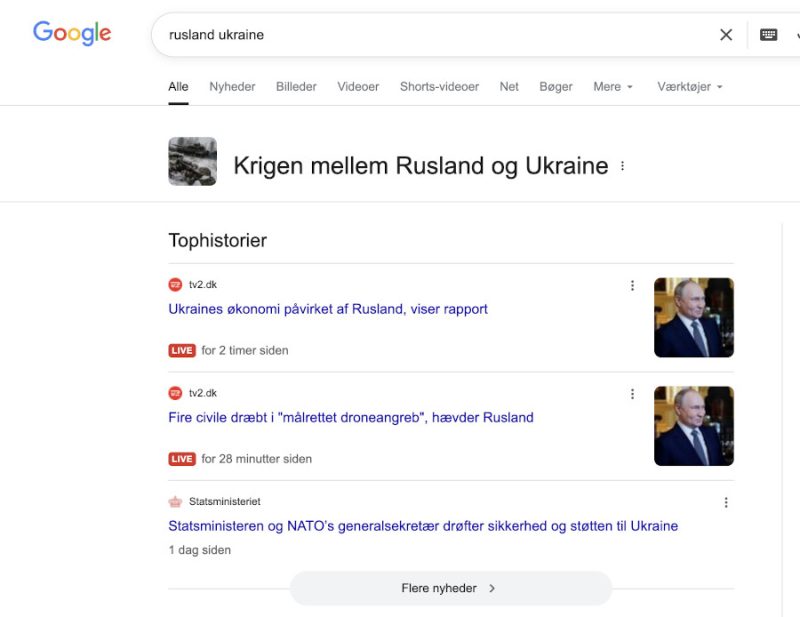
This example illustrates why it’s very important to use unique URLs for each of your BlogPosting entries and ensure your dates are all accurate and specific to each entry. Not using unique URLs (in the “url” property under “BlogPosting) is the biggest mistake I routinely see, even among major publishers.
According to Ulrik, being in Top Stories isn’t the only benefit of using a permanent URL approach. He told me he’s also seen increases in traffic from the SERP outside of Top Stories to individual blog posts within a single “evergreen” liveblog.
As cool as that example is, keep in mind that your mileage may vary. I’ve not yet seen this working in a highly competitive U.S. market against the likes of NY Times and Washington Post. But then again, I haven’t seen anyone try it.
That said, knowing it’s technically possible might give you the confidence to try something new with Live Blogs that could set you apart and allow you to get more out of your efforts. According to Ulrik, “We’ve been pushing the limits of schema to maximize how our live blogs surface in Google because we believe strongly that real-time reporting is one area where humans still have the edge over AI for the foreseeable future. Live coverage of news events is very important to our brand, our users, and to Google by extension.”
Are You Live Blogging?
I’d love to hear from other news publishers who have successfully implemented LiveBlogPosting and appeared in Google with the “Live” badge. Share your experiences and observations in the comments below.
This post was originally published in March of 2021.